Phase 3 · Analyse
The Pareto chart: how to make one, step by step
A Pareto chart sorts the causes of a problem by how much each one weighs. It tells the team where to put its effort first, instead of spreading it across every cause at once.
In short
A Pareto chart is a bar chart that ranks the causes of a problem from largest to smallest, with a line showing the cumulative percentage. It shows the few causes that account for most of the effect, so the team knows where to act first.
What it is
It rests on the 80/20 rule, a rule of thumb rather than a law: in many problems a small number of causes explains most of the effect. The split is rarely exactly 80/20; what matters is that the bars fall sharply and the line rises quickly.
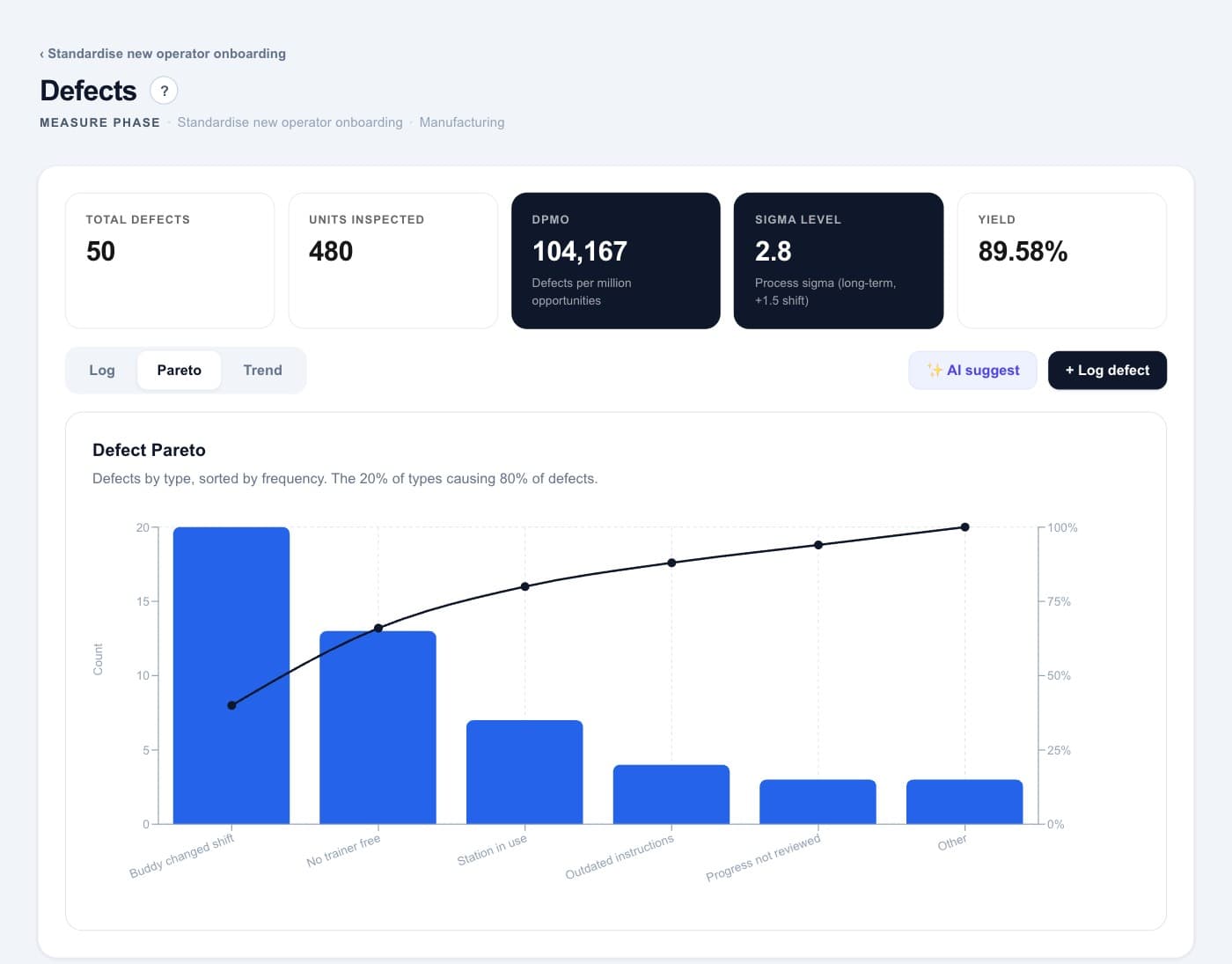
The bars show each cause, from left to right in descending order. The line adds up their share until it reaches 100%. Where the line flattens, the vital few end and the rest begins.
When to use it
- In the Analyze phase, to choose which causes from the Ishikawa diagram to study first.
- When there is data on how often each cause occurs, or on what it costs.
- After an improvement, to check whether the order of the causes has changed.
How to do it, step by step
- 1Decide what to count and over what period. One unit for every cause: occurrences, days lost or cost. And a period long enough to be representative.
- 2Group the data into causes. Use the categories from the Ishikawa diagram. Keep “Other” small: if it is one of the largest bars, split it.
- 3Count and sort from largest to smallest. Add up each cause and order them in descending order. “Other” always goes last.
- 4Calculate the cumulative percentage. Divide each running total by the grand total. The last cause reaches 100%.
- 5Draw the bars and the line. Bars for each cause, the cumulative line above them. Mark where the line starts to flatten.
- 6Choose the vital few and confirm them. Take the causes that explain most of the effect and check them with the team before acting.
Worked example
Case: a plant that wants new operators to reach standard output sooner.
| Cause of a lost training day | Days lost (last 11 new operators) | Cumulative % |
|---|---|---|
| The buddy changed with the shift | 20 | 40% |
| No trainer free that day | 13 | 66% |
| Practice station taken up by production | 7 | 80% |
| Out-of-date work instructions | 4 | 88% |
| Progress not reviewed | 3 | 94% |
| Other | 3 | 100% |
Common mistakes
- Categories so broad that one bar holds almost everything, or an “Other” bar among the largest.
- Counting how often something happens when what matters is what it costs.
- Using too short a period, so one bad week decides the order.
- Reading 80/20 as an exact law and ignoring a cause just beyond the line that is cheap to fix.
Frequently asked questions
What is the Pareto principle?
It is the observation, named after the economist Vilfredo Pareto, that a small share of causes often explains most of an effect. In quality work it is known as the 80/20 rule, a rule of thumb rather than a measured law.
How do you calculate the cumulative percentage?
Sort the causes from largest to smallest, add them up one by one and divide each running total by the grand total. The last cause always reaches 100%.
What is the difference between a Pareto chart and a histogram?
A histogram shows how a measured value is distributed across ranges, in the order of those ranges. A Pareto chart shows categories, sorted by size, with a cumulative line.